


What Tide actually gives you
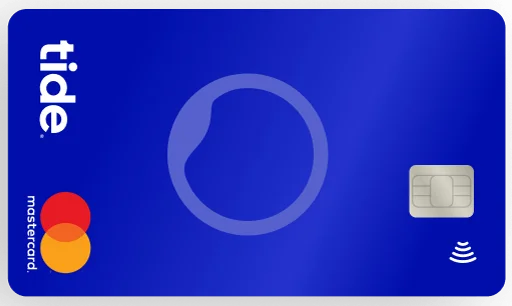
At its core, Tide is a business current account provided through ClearBank, with a Mastercard debit card and a mobile-first app. What sets it apart from a traditional business bank account is the layer of integrated tools built on top: invoicing, savings, expense cards, payment acceptance, accounting integrations, payroll, and company formation — all connected to the same transaction feed.
The pitch is consolidation. Instead of paying for a bank account, a separate invoicing tool, a separate expense card provider and a separate accountant's portal, you get one app where everything connects to the same transaction feed. Whether that is worth it depends on which of the features below you would actually use. This page covers all of them in detail.
| Feature | Available on | Cost beyond plan | Best for |
|---|---|---|---|
| Business current account | All plans | Included | Every business |
| Instant Saver (savings) | All plans | Included | Businesses with cash reserves |
| Invoicing (3/month) | All plans | Free up to 3; Invoice Assistant £5.99+VAT/m for unlimited | Freelancers, service businesses |
| Payment Links | All plans | Card transaction fees apply | Businesses without a card terminal |
| Tap to Pay on iPhone | All plans | Included | Tradespeople, mobile businesses |
| Tide Card Reader | All plans | From £159+VAT hardware | Retail, hospitality, in-person sales |
| International payments | All plans | Per-transfer fees apply | Importers, exporters, overseas suppliers |
| Expense cards | Smart+ (1 included) | £5/month per card on Free | Businesses with staff spending |
| Virtual debit card | All plans | Included | Online purchases, security |
| Team Access | All plans | Included | Co-founders, accountants, managers |
| Xero Connector | Smart, Pro, Max | Included in plan | Xero users |
| Tide Accounting | Pro (included), others add-on | From £13.99+VAT/month | Businesses needing full bookkeeping |
| Making Tax Digital | All plans | Included | VAT-registered businesses |
| Payroll | Max (included) | Add-on on other plans | Businesses with employees |
| Company formation | All plans | Separate formation fee | New limited companies |
| Credit Score Insights | Max only | Included in Max | Businesses monitoring creditworthiness |
| Credit Flex | Eligible accounts | Subject to eligibility | Businesses managing cash flow |
Instant Saver: earn interest on your business reserves
Tide Instant Saver is an instant-access savings pot attached to your business current account. You move money in and out from your main account, interest accrues on the balance, and you can access your funds at any time — there is no notice period or lock-in. It is designed for money you want to keep separate for discipline reasons (a VAT set-aside, a tax pot, retained profit) while still earning a return.
The interest rate is variable and depends on your plan tier. Free earns 2% AER, Smart earns 2.5% AER, Pro earns 3% AER, and Max earns up to 3.75% AER. All plans also have access to the Intro Offer rate of up to 4% AER for new savers, subject to the tiered structure in Tide's Summary Box. Rates can change, so always check the current rate on Tide's savings page before planning around a specific figure.
For the REFER200 campaign, Instant Saver is central to the £125 reward step: deposit at least £5,000 within 7 days of account opening and keep it there for one month. The reward itself will typically dwarf the interest earned in that period, so choose your plan based on your transfer and FX needs rather than the marginal AER difference.
| Plan | Standard AER | Intro Offer AER | Minimum deposit |
|---|---|---|---|
| Free | 2.00% | Up to 4.00% | £1 |
| Smart | 2.50% | Up to 4.00% | £1 |
| Pro | 3.00% | Up to 4.00% | £1 |
| Max | Up to 3.75% | Up to 4.00% | £1 |
Invoicing: raise, send and get paid
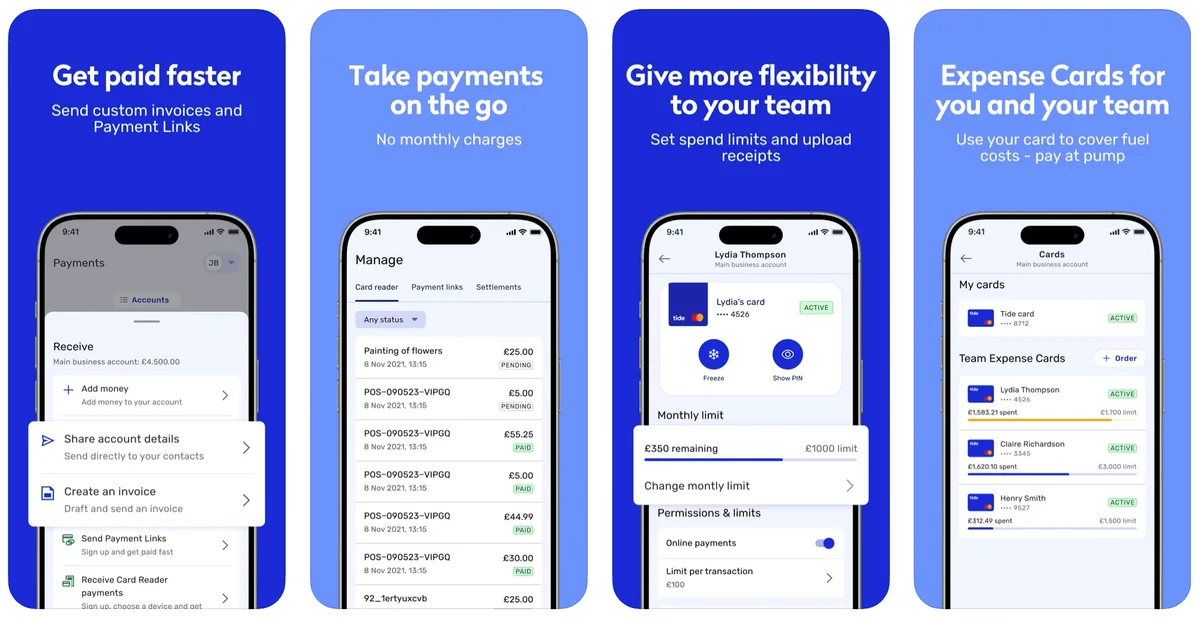
Tide's invoicing tool lets you create branded invoices inside the app or web dashboard, send them directly to a client's email, and track whether they have been viewed and paid. When a client pays into your Tide account by bank transfer, the payment is matched against the open invoice automatically — no manual reconciliation against a separate spreadsheet.
The basic invoicing tool is available on all plans and includes 3 free invoices per month. For businesses that invoice more frequently, the Invoice Assistant add-on (from £5.99+VAT/month) unlocks unlimited invoices, automated payment reminders, and recurring invoice scheduling. Max plan members get unlimited invoicing included in their plan fee.
Clients can pay by bank transfer or by card where supported. Card payments carry a processing fee. The invoicing tool does not handle multi-currency invoicing at scale or complex project-based billing — for those needs, a dedicated tool like FreeAgent or QuickBooks is more appropriate.
| Feature | Free | Smart | Pro | Max |
|---|---|---|---|---|
| Free invoices per month | 3 | 3 | 3 | Unlimited |
| Invoice Assistant (unlimited + reminders) | Add-on £5.99+VAT/m | Add-on £5.99+VAT/m | Add-on £5.99+VAT/m | Included |
| Automatic payment matching | ✓ | ✓ | ✓ | ✓ |
| Client payment by card | ✓ (fees apply) | ✓ (fees apply) | ✓ (fees apply) | ✓ (fees apply) |
Payment Links: get paid without a card terminal
Payment Links let you generate a shareable link in seconds that customers can use to pay you by card — no card reader, no website, no checkout integration required. You can include a Payment Link in an invoice, send it by WhatsApp or email, or share it on social media. When a customer pays, the funds arrive in your Tide account and are matched against the relevant transaction.
Payment Links are available on all plans at no extra monthly cost. Card transaction fees apply when a customer pays through a link — these are standard card processing fees, not a Tide-specific charge. Payment Links are distinct from Tide's card reader and Tap to Pay features: they are for remote or online payments, not in-person transactions.
Tap to Pay on iPhone: accept contactless payments anywhere
Tap to Pay on iPhone turns a compatible iPhone into a contactless card terminal. Customers tap their card or phone on your iPhone to pay — no separate hardware needed. The feature is available on all Tide plans at no extra cost, and transactions appear in your Tide account feed in real time. Android support is listed as coming soon.
This is particularly useful for tradespeople, market traders, mobile businesses and anyone who takes payments on the go but does not want to carry a separate card reader. The transaction limit for contactless payments applies, and card processing fees apply to each payment.
| Feature | Tap to Pay on iPhone | Tide Card Reader |
|---|---|---|
| Hardware required | None (uses your iPhone) | Card reader from £159+VAT |
| Payment types accepted | Contactless only | Contactless + chip and PIN |
| Device | iPhone (iOS) | Standalone device |
| Plan availability | All plans | All plans |
| Best for | Occasional, mobile payments | Regular, in-person retail or hospitality |
Tide Card Reader: chip and PIN for in-person sales
The Tide Card Reader is a physical card terminal that accepts contactless, chip and PIN, and magnetic stripe payments. It integrates directly with your Tide account, so every sale appears in your transaction feed automatically. The card reader is available to purchase from £159+VAT and works on all plan tiers.
It is designed for businesses that take regular in-person payments: retail shops, cafés, market stalls, tradespeople with a fixed location. Unlike Tap to Pay, the card reader supports chip and PIN transactions, which are required for payments above the contactless limit and for customers whose cards do not support contactless.
International payments: send and receive in foreign currency
Tide supports international bank transfers including Euro SEPA payments, SWIFT transfers, and SWIFT payments in foreign currency. These are available on all plan tiers, though the fees per transfer vary. The most important plan-level difference for international payments is the FX fee on card transactions: Free plan members pay a 2.75% foreign exchange fee on every card payment made in a foreign currency; Smart, Pro and Max members pay 0%.
For businesses that pay overseas suppliers by card, buy software subscriptions priced in USD or EUR, or travel for work, the 0% FX fee on Smart and above is often the single most financially significant plan feature. At £500/month in foreign-currency card spend, the saving versus Free is £13.75/month — more than the Smart plan fee itself.
For high-volume international bank transfers, it is worth comparing Tide's per-transfer fees against a specialist currency provider such as Wise or Currencies Direct, which may offer better rates on large or frequent transfers.
| Feature | Free | Smart | Pro | Max |
|---|---|---|---|---|
| FX fee on card payments | 2.75% | 0% | 0% | 0% |
| Euro SEPA transfers | ✓ | ✓ | ✓ | ✓ |
| SWIFT payments | ✓ | ✓ | ✓ | ✓ |
| SWIFT (foreign currency) | ✓ | ✓ | ✓ | ✓ |
| CHAPS payments (free/month) | — | 2 | 2 | 5 |
Expense cards: team spending with controls
Tide expense cards are physical or virtual Mastercard debit cards issued to employees, contractors or partners, each linked to the main business account. Every transaction on an expense card appears in the shared feed, tagged to that card holder, so you are not reconciling a pile of paper expense claims at month end.
Each card can carry its own spend limit (daily, weekly or per-transaction) and optional category restrictions. Cards can be frozen or cancelled instantly from the app. The number of expense cards included in your plan varies by tier: Free includes none (cards are available at £5/month each), Smart includes 1, Pro includes 2, and Max includes 3. Additional cards beyond the included number are available at an extra monthly fee.
| Plan | Included cards | Additional cards | Virtual cards |
|---|---|---|---|
| Free | 0 | £5/month per card | ✓ free |
| Smart | 1 | Extra fee per card | ✓ free |
| Pro | 2 | Extra fee per card | ✓ free |
| Max | 3 | Extra fee per card | ✓ free |
Accounting tools: bookkeeping built into the feed
Tide's accounting tools cover three things: automatic categorisation of transactions into expense types, in-app receipt capture (photograph a receipt and attach it to the matching transaction), and integrations that push transaction data into third-party bookkeeping software. It is not a replacement for an accountant or a full double-entry bookkeeping system — it is the plumbing that feeds one.
The Xero Connector, which syncs transactions directly into Xero, is included on Smart, Pro and Max plans. Third-party integrations with FreeAgent, QuickBooks and Sage are available on all plans. Tide Accounting — a full bookkeeping, self-assessment and VAT return tool — is included in the Pro plan and available as a paid add-on (from £13.99+VAT/month) on other plans.
| Feature | Free | Smart | Pro | Max |
|---|---|---|---|---|
| Receipt capture | ✓ | ✓ | ✓ | ✓ |
| Auto-categorisation | ✓ | ✓ | ✓ | ✓ |
| Third-party integrations (Xero, QBO, FreeAgent) | ✓ | ✓ | ✓ | ✓ |
| Xero Connector (direct sync) | — | ✓ | ✓ | ✓ |
| Tide Accounting (full bookkeeping) | Add-on £13.99+VAT/m | Add-on £13.99+VAT/m | ✓ included | Admin Extra bundle |
| Making Tax Digital tools | ✓ | ✓ | ✓ | ✓ |
Payroll: HMRC-recognised payroll software
Tide Payroll is an integrated payroll tool that automates pension payments, calculates PAYE tax and National Insurance, and submits RTI (Real Time Information) reports to HMRC. It is HMRC-recognised software, meaning it meets the legal requirements for payroll submission in the UK.
Payroll is included in the Max plan and available as a paid add-on on other plans. It handles the core payroll calculations and submissions but is not a full payroll bureau service — you are still responsible for ensuring employee details, tax codes and pension contributions are correct. For businesses with complex payroll needs (multiple pay schedules, salary sacrifice, complex benefits), a dedicated payroll provider may offer more depth.
Team Access: multiple users on one account
Team Access lets you add other people as users on your Tide account with their own login and a defined permission level. Common use cases include giving a bookkeeper or accountant read-only access to the transaction feed, giving a co-founder or office manager full access to make payments, or giving a team member access to raise invoices without being able to move money.
Team Access is available on all plans. The permission levels and number of users available vary by tier. On Free, access is typically read-only; paid plans unlock more granular permissions. The Business Phone Number feature, which gives your business a dedicated phone number for professional calls, is included on Smart, Pro and Max.
Cash and cheque deposits
Tide supports cash deposits at Post Office and PayPoint locations across the UK, and cheque deposits through the app by photographing the cheque. Both are available on all plans, but both are charged per item regardless of plan tier — the plan does not buy you a deposit allowance.
Cash deposits are useful for businesses that take cash payments — market traders, tradespeople, hospitality — but the per-deposit fee means frequent small deposits can be expensive. It is worth calculating your expected monthly deposit cost separately from your transfer allowance when choosing a plan, since the two costs are independent.
Company formation: open account and incorporate together
Tide offers company formation as a service alongside account opening, allowing you to register a new limited company at Companies House and open the business current account in a single process. This is useful for new businesses that have not yet incorporated — rather than registering with Companies House separately and then applying for a bank account, the two steps are combined.
Company formation carries a separate fee from the account itself. Tide also offers a Company Secretary service for ongoing statutory compliance obligations. If you are forming a company specifically to open a Tide account and pursue the REFER200 offer, note that the campaign is available to new Tide members regardless of whether they form the company through Tide or arrive with an existing company number.
Credit features: Credit Flex and Credit Score Insights
Credit Flex is a feature that lets eligible Tide members split the cost of past or future payments to manage cash flow, without a formal loan application. It is available to eligible accounts subject to Tide's own criteria and is not guaranteed to all members. Credit Flex is listed as available on all plans for eligible accounts.
Credit Score Insights is a Max-plan-only feature that lets you monitor your business credit score and understand the factors affecting it from within the Tide app. For businesses that are actively managing their creditworthiness — ahead of applying for finance, for example — this is a useful tool. For businesses that do not need to monitor credit, it is not a reason to upgrade to Max on its own.
Tide also provides access to a range of business finance products — business loans, asset finance, invoice finance, and government-backed Start Up Loans — through its lending marketplace. These are separate products from the current account and are subject to eligibility and credit assessment.
| Feature | Free | Smart | Pro | Max |
|---|---|---|---|---|
| Credit Flex | Eligible accounts | Eligible accounts | Eligible accounts | Eligible accounts |
| Credit Score Insights | — | — | — | ✓ |
| 0.5% cashback on card spend | — | — | — | ✓ |
| Business loans marketplace | ✓ | ✓ | ✓ | ✓ |
How features relate to the REFER200 offer
The REFER200 campaign has two independent steps: up to £75 for reaching £100 of qualifying card spend within 30 days of account opening, and up to £125 for depositing at least £5,000 into Tide Instant Saver within 7 days of account opening and keeping it there for one month.
Several features can contribute to the £100 card spend step: paying suppliers by Tide card, using expense cards for business purchases, using Tap to Pay to take customer payments (the transaction fee is a card payment from the account), or paying for business tools and subscriptions on the Tide card. None of the non-card features — invoicing, payroll, accounting, company formation — contribute to either reward step directly.
| Feature | Can contribute to £100 card spend? | Notes |
|---|---|---|
| Tide debit card | Yes (subject to qualifying transaction rules) | Primary route for most members |
| Expense cards | Yes (subject to qualifying transaction rules) | Team spend on expense cards may count |
| Tap to Pay | No | Receiving payments, not making them |
| Payment Links | No | Receiving payments, not making them |
| Invoicing | No | Not a card transaction |
| Instant Saver | No (but central to £125 step) | Deposit £5,000 within 7 days for £125 |
| Payroll | No | Not a card transaction |
Tide vs buying tools separately: the honest comparison
A small business assembling tools outside Tide might use a traditional bank for the account, FreeAgent or QuickBooks for invoicing and bookkeeping, SumUp or Zettle for a card reader, Pleo or Soldo for expense cards, and a currency specialist for international payments. That is five subscriptions, five logins, and five places where data can go stale between systems.
Tide's advantage is consolidation and zero-lag data: the invoice, the transaction and the account are the same system, so there is no bank feed delay, no import step, and no reconciliation between two separate apps. The trade-off is depth: each of Tide's individual tools is shallower than the dedicated specialist equivalent. Invoicing is simpler than FreeAgent's. Expense cards have fewer controls than Pleo's. International payments are less competitive on large transfers than Wise.
For a business that is genuinely using most of the features, the consolidation value is real. For a business that already has a working stack and only needs the current account, the bundled tools are largely irrelevant and the plan choice should be made on transfer allowance and FX fees alone.